Planner System Update

It’s that time of year again! Everyone in the planner community is eyeing the 2025 planners and making their decisions about what is going to give them “planner peace” in the new year.

As for me, I think “planner peace” is like the Easter Bunny or Santa. Doesn’t exist. And that phrase is beginning to make my ass twitch.

Why am I so grumpy about planners, you ask?

If you have been reading this blog for a while, you can probably guess. You might remember my previous posts on my various misguided attempts to find the perfect (for me) planner to replace my bullet journal, and you’ve likely been expecting this post.

To catch you up if you haven’t been following along on this adventure… I first tried the Bullet Journal method back in summer of 2017. Then, during then pandemic when “planning” sort of seemed like a sick joke, I decided to try moving from a BuJo to dated planner (Passion Planner monthly). I don’t think I made it through even half of 2021 before I bailed and went back to the BuJo method.

I tried again in 2022 with a slightly different dated planner system (Midori monthly). That also didn’t work out. Then I made another attempt in 2023 with yet a different planner set up (Passion Planner weekly). Another fail by mid-year that had me trying the Hobonichi Techo half-year planner instead. I was convinced it was going to work because it had monthly, weekly, AND daily planner pages, which seemed to be what I was missing in my previous attempts to replace my BuJo.

And I was right. Mostly. That set-up worked well enough that I convinced myself to try the full year Hobonichi in 2024.

This year’s planner: a Hobonichi Techo 2024

However… there aren’t a lot of blank pages available in that planner for goal planning or what the BuJo folks call “collections” (ex: project task lists, notes, etc.). And, because I wanted to have a dedicated place to track my running, I got a running journal as well.

Running journal

In addition to those, I have a separate notebook for journaling, plus another for each of my writing projects.

The current in-progress notebook stack

It’s too much, and it’s making me want to return to my bullet journal. I was doing my best to hold off until January before making a change, but this past week I decided to give up and go back to the BuJo, at least for the rest of September.

The notebook I was using for my bullet journal before I switched to the dated planner still has about a hundred blank pages left. I think it’s nearly enough to get me through the rest of this year. So, I’m going to see if I can even remember how to BuJo, and see if it’s just the entire concept of planners that has been frustrated, or if I finally can find some “peace” by going back to the BuJo Method.

Expect an update sometime in December, when I commit to a 2025 planning system…

Tweaking My Planner System (Again)

Most of today was spent making progress on cleaning up the novel I’m working on, but I did spend a little time thinking about my 2024 planning system. In a previous post, I mentioned that I’ve switched from using a bullet journal to trying out the half-year Hobonichi Cousin. It’s been working well. Mostly. But there have been a few things I’m not entirely pleased with.

The first of those is that the Cousin doesn’t have a lot of blank pages for free-form planning and notes. So, if you want to do that, you’re limited to using the daily pages, or looking elsewhere. The more I tried to stay in the planner and work around this, the more frustrating it was to keep track of progress toward my quarterly and monthly goals. Eventually, I tried using Obsidian to fill in the gaps.

After months of trying to keep track of tasks across multiple notes in Obsidian and struggling to find a view that worked for me, I gave up. About a week ago, I started pulling all the tasks I’d created out of my Obsidian notes and moving them to my planner. The only problem was, I still had no place to put my goal and project planning. I think this is why some people end up using multiple planners. But I am determined to figure out how to make everything work in one.

The solution I’ve come up with is one that I’ve found by watching planning videos from other Cousin users on YouTube. That’s how I figured out that you can buy a thin companion notebook that has only about forty sheets in it. These notebooks are meant to slip into the back cover of your planner. Awesome! Problem solved!

Except, I live on a tiny island. I’d need to order these online, because there are no stores here that sell that sort of thing. And there is no way (given the absolutely slammed holiday mail situation on said tiny island) that these would arrive anytime soon. Best case, they’d likely be here a few days before the New Year.

Not to worry. I have a perfectly good bullet journal that I only used for three months. There is still at least half a notebook worth of blank pages in there. So, new plan! I am going to use my old bullet journal for noodling out 2024 goal and project planning. Once I have everything figured out, I’m going to copy it over onto one of the precious few blank pages in my Hobonichi Cousin.

Here’s how it’s going to work: There are exactly four blank pages in the planner. I’m going to use one for each quarter’s goals. Then I’m going to use the blank page at the start of each batch of monthly pages as a place to track all my monthly projects and task. This will be kind of like the right-hand side of the monthly spreads I used to do in my bullet journal.

I also have the start of a plan for how I am going to track my reading in the planner. I don’t have a good spot for doing any readathon spreads, though. But I have some ideas about how I want to handle that, and I have time to figure it out. I think the next Magical Readathon isn’t until April.

I’m going to keep using Obsidian. Overall, I like it. I think it works best for things like you would put into a “collection” in a bullet journal. So, lists of movies I want to watch or books I want to read, research and links for vacation planning, notes on what I want to remember to fix in my next edit pass on my book, a brainstormed list of tasks for a project, that type of thing. This is a great addition to my system because it’s digital and searchable and syncs across all my devices (you can’t hyperlink in a notebook). Plus, I definitely do NOT have a place (other than the daily pages) for that sort of thing in the Cousin.

Ultimately, I envision the Obsidian-Cousin flow looking something like this: Notes in Obsidian will generate tasks and/or projects. Those will get migrated to my planner so I can keep track of them. Meanwhile, my daily pages in my planner will probably generate content that needs to be migrated to a note in Obsidian. Either an existing note (for example, a new task to add to a project note), or a new note (like a place to park a new story idea so I can add to it later).

I have to say, it’s a relief to have a plan. When I feel like I have things I need to keep track of and no place to put them, they just fester in my brain, taking up space and keeping me from doing other, more creative things. Now that I’ve been able to off-load some of that junk, knowing I have a system in place so I don’t just forget about it, I feel a bit better.

Next up is taking some time to sort out my goals and projects for next year. But, I’m trying to hold off on doing that until next week. After this draft of my novel is done.

I’m planning a series of posts at the end of the month where I’ll talk more about how I did on my 2023 goals and what some of my goals are for 2024. When I do those, I’ll take some photos of my planner spreads to make it easier to see what I’m doing.

A Planner Update for the Planners

Back at the start of the year, I mentioned I was planning on using two planners this year. One was a Passion Planner weekly for managing my writing goals that I also planned to use as a reading journal. The other was going to be my free-form bullet journal which would be where I kept track of my daily to-do lists and household admin tasks.

How it started…

That set-up lasted about six months.

Can you guess what caused my system to fail?

If you guessed the Passion Planner, then you probably have been reading this blog for a while. You may even have said to yourself, back when you read that post at the start of the year and saw that I was making another attempt at using the Passion Planner this year, “Good luck with that!”

If you did, give yourself a prize. You were correct. The Passion Planner didn’t work for me. Again.

Never have I really wanted a planner to work so much before. I mean, that cover is SO CUTE! And the whole set-up is all about achieving your goals! How much more “me” can you get?

I think the problem is that I just hate using multiple planners. I need ONE that does everything. That means monthly, weekly, and daily views. Plus some blank pages for random stuff I need to keep track of.

The twist is, around the same time that I came to that conclusion, I realized that bullet journaling wasn’t really working for me, either.

I started bullet journaling because of the flexibility. It allowed me to have any kind of view that I wanted. I just needed to create it on the page. But, the more I found what worked for me, the more I got sick of creating the framework for each day or week or month. And because I had to create everything as I went along, I never had a good place to park future tasks and milestones as I planned out projects. I just couldn’t get that whole “future log” thing to work for me. Every time I made one, I would completely forget it existed.

Frustrated and annoyed, I went in search of “the perfect planner.” Which, just to be clear, I know does not exist.

I ended up buying a Hobonichi Cousin Avec to try using for the second half of 2023. It’s not perfect, but it does have monthly, weekly, and daily pages.

How it’s going…

Then I pulled the reading journal pages out of the back of my Passion Planner and made them into a little booklet so I could continue using them.

So far, this has been working pretty well. I still hate having the reading journal stuff separate, but at least now I can tuck them into my planner and pretend it’s all the same notebook. But next year, I want to incorporate the reading journal stuff into my daily planner.

The big thing I’m struggling with is STILL future planning. But now it’s not because I don’t have a place for it. I think I’m realizing that not having a place for it meant it wasn’t getting done effectively.

As an example, I like to plan quarterly and refine that plan monthly. Unfortunately, I haven’t found a good space in my Hobonichi for noodling out my quarterly goals and associated projects. Maybe it’s just because this is the half-year version of the planner, but there aren’t a lot of blank pages at the back.

For Q4 of 2023, I did all my goals brainstorming and associated project planning in Obsidian (which I’m just starting to mess around with). Once I had that all sorted out, I transferred my October goals onto the monthly calendar in my planner, and then started adding milestones and weekly plans to the monthly, weekly, and daily calendar pages. But I kept November and December in Obsidian. This way, I could tweak my plans based on how October went before finalizing my November goals, projects, and tasks and putting all that into my planner.

Will this bring me planner peace?

This new system is working well enough that I bought the full year Cousin for 2024. Aside from slapping some stickers on the front, I haven’t started to set it up, yet. I think I’ll wait until at least mid-December to start messing with that.

If you like, I’ll do another post at the end of the year to walk through my new setup once it’s ready to go. But next up will be my October reading recap. Did I finish everything on my list? Stay tuned to find out.

NaNoWriMo Prep: Manage Your Time

What’s this? A second week dedicated to planning? Sounds right to me. After all, half the battle is finding the time to get the words on the page. Even when you are absolutely not in the mood to write. Probably especially then.

As a reminder, the schedule for NaNoWriMo prep is as follows:

  1. Develop a Story Idea (September 12-18) — Click Here to Read This Post
  2. Create Complex Characters (September 19-25) — Click Here to Read This Post
  3. Construct a Detailed Plot or Outline (September 26 – October 2) — Click Here to Read This Post
  4. Build a Strong World (October 3-7) — Click Here to Read This Post
  5. Organize Your Life for Writing! (October 10-16) — Click Here to Read This Post
  6. Find and Manage Your Time (October 18-24) <— You Are Here

Last week I talked a little about how I try to identify all the tasks and projects that might distract or derail me from my writing. Once I’ve rescheduled, canceled, or delegated everything that I possibly can, it’s time to sit down with my calendar and figure out when exactly I’m going to get my writing done.

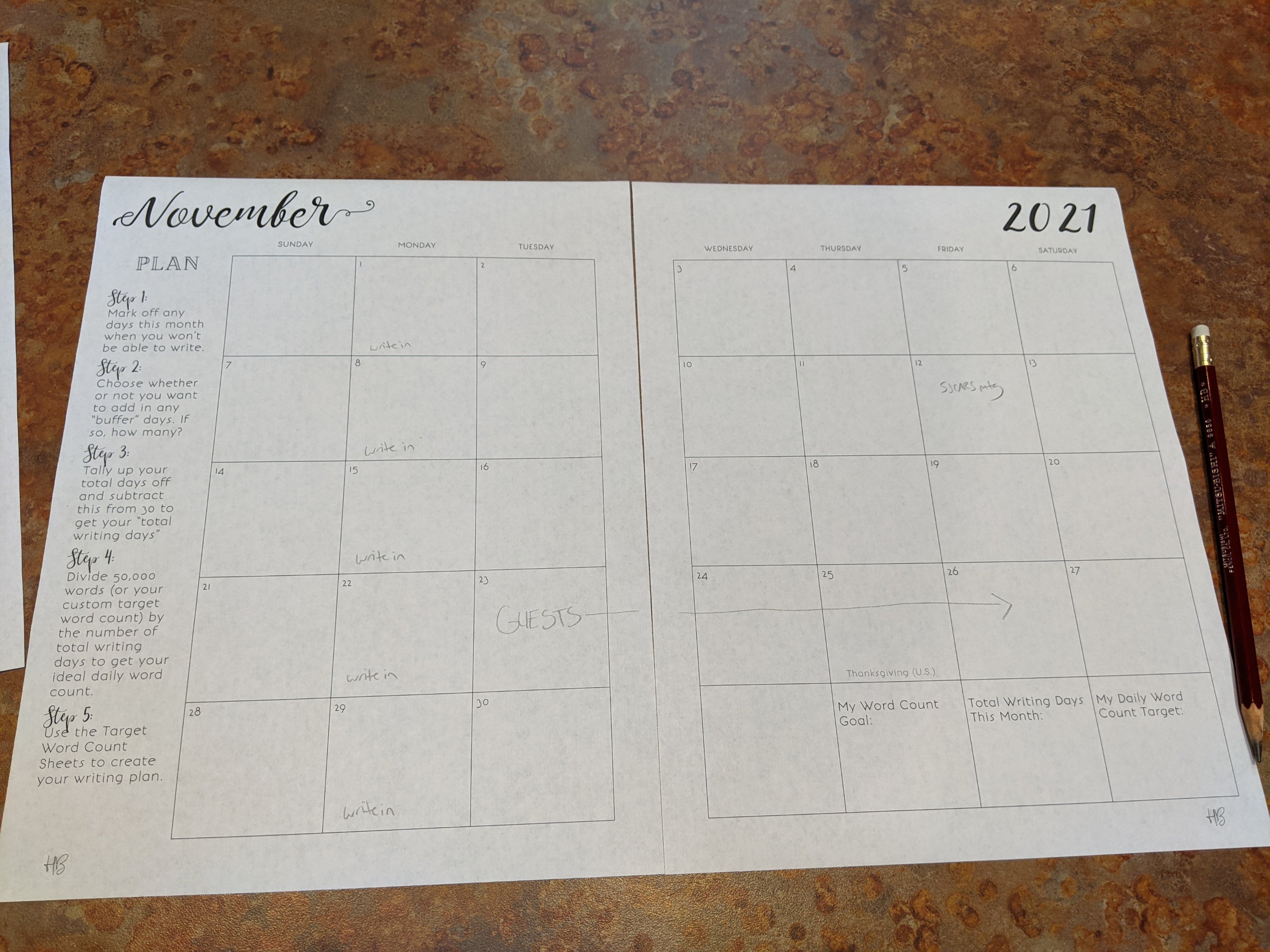
For the first part of this exercise, I used a printout of the calendar from Sarra Cannon’s Preptober workbook to create an overview of the month. This way, I can quickly see which days it is going to be challenging to find time to write, and which days I may be able to squeeze in some extra writing time.

In general, I’m adding only the big, out of the ordinary events to this calendar. I’m assuming that, unless otherwise noted, I just have my usual daily schedule to work around. The first thing I add are my conflicts, anything I couldn’t cancel or reschedule when I was organizing my time for November. Then I add my write-ins. Those may end up being my only dedicated writing time for the day (if it’s an already busy day), or they could represent possible extra writing time, if I also have time to fit in my usual writing sprints on my own.

Once I finish my calendar overview, I transfer those notes over to my word count spreadsheet. You can see a sample of what that looks like here and make a copy of the sheet for yourself to use, if you like. In the sample, I added my write-ins over in the “notes” column in green, and I added conflicts like Thanksgiving in red. On my actual spreadsheet there are more items, but the sample gives you an idea of what I’m doing.

Next, it’s time to do some math and figure out my daily word count goal. But first, let’s pause to talk about word count goals for a minute. Word count is not always the best measure of progress on a project, and it can be really demotivating to hear how many words others can write in a day when you are struggling to even get any writing done. However, when your goal is to “banish the inner editor” and get words (ideas) onto the page so that you can finish the whole draft before going back to make everything better, I think word count is a pretty good metric.

But if you find watching your word count to be completely demotivating, then time working on a project can be a good alternative. Pages or chapters written is another method. Marking milestones by acts or other major plot beats can be a good option. I use and like all these. The key is that you have a good idea of what conversion rate to use (words per page on average, words per hour on average, etc.) so that you have some idea if you’re on track to hitting your goal.

I’m using word count for my daily NaNoWriMo goal, but I’m also doing a conversion on that daily goal so I can estimate how many hours I need to set aside for writing each day. This is where the spreadsheet (or a calculator) really comes in handy.

There are two main strategies for establishing your NaNoWriMo daily word count goal. The first is what I like to call the “peanut butter” method, where you take the word count goal and divide by the total number of writing days to come up with a daily average that you spread evenly across the month (like peanut butter on bread, assuming you’re not allergic to either of those things). This is the traditional 1667 words per day NaNoWriMo target.

The other method tries to capitalize on the fact that you have the most motivation at the start of the month (and probably also the least number of schedule conflicts, if you celebrate the U.S. holiday of Thanksgiving). This method is called “reverse NaNoWriMo.” I didn’t invent it, but I think it’s brilliant. Since I stumbled across it on the internet, it’s been what I try to do most years when I participate in NaNoWriMo.

You’ll find both the traditional “peanut butter” method and the “reverse NaNoWriMo” method in my spreadsheet. I’ve also added a third set of columns which is what I use when I customize my word count goal for each day. I use the custom column to adjust my daily goal for the days where I have conflicts that are going to restrict my writing time. That’s why I put all those events in the “notes” column.

Because of how my schedule is shaping up this year, I am planning on starting with the “reverse NaNoWriMo” word count goals to capitalize on that early motivation. Then when my holiday guests arrive, I’m planning on shifting down to a word count goal that is more like what I can reliably write in one thirty minute sprint. This is where that conversation rate stuff comes in handy.

It’s all well and good to know how many words you want to write in a day. But how long is it going to take you to write those words, on average? My conversion rate is based on how many words I can usually write in one thirty minute sprint. For me, that is somewhere between 300 and 500 words. So I like to use 400 as an average word count estimate for one sprint. There’s a spot in my spreadsheet where I plug in my average words per sprint, and it will calculate how many sprints I need each day to hit that day’s word count goal.

Let’s take the first day of November as an example because that’s the day when I am scheduled to write the most words (my goal = 3335 words). My spreadsheet says that is going to take me about 8.3 sprints (or just over 4 hours). I know I have a write-in that evening, and we usually get in about two and a half sprints during that write-in. That leaves another 6 sprints (3 hours of writing, not counting breaks) I need to find time for earlier in the day. If I can’t find time in my schedule, then I need to adjust my word count target to something more realistic.

This year, I’m actually scheduling writing sprint blocks on my Google calendar so that I know how many hours I need to be writing each day in order to hit that day’s word count goal. Normally, I don’t bother to block out chunks of writing time. I just keep track of my word count goal and squeeze in writing time between other activities after doing a lot of procrastinating. You can guess how well that works.

I’ll probably end up moving those writing blocks around as needed, but I think that having the one or two hour blocks of time sitting there on my schedule will be a good reminder that, even if I put off writing, I’m still going to need at least an hour to write 1000 words. So, it’s probably better to get it done early because I’m not going to find more time in the day.

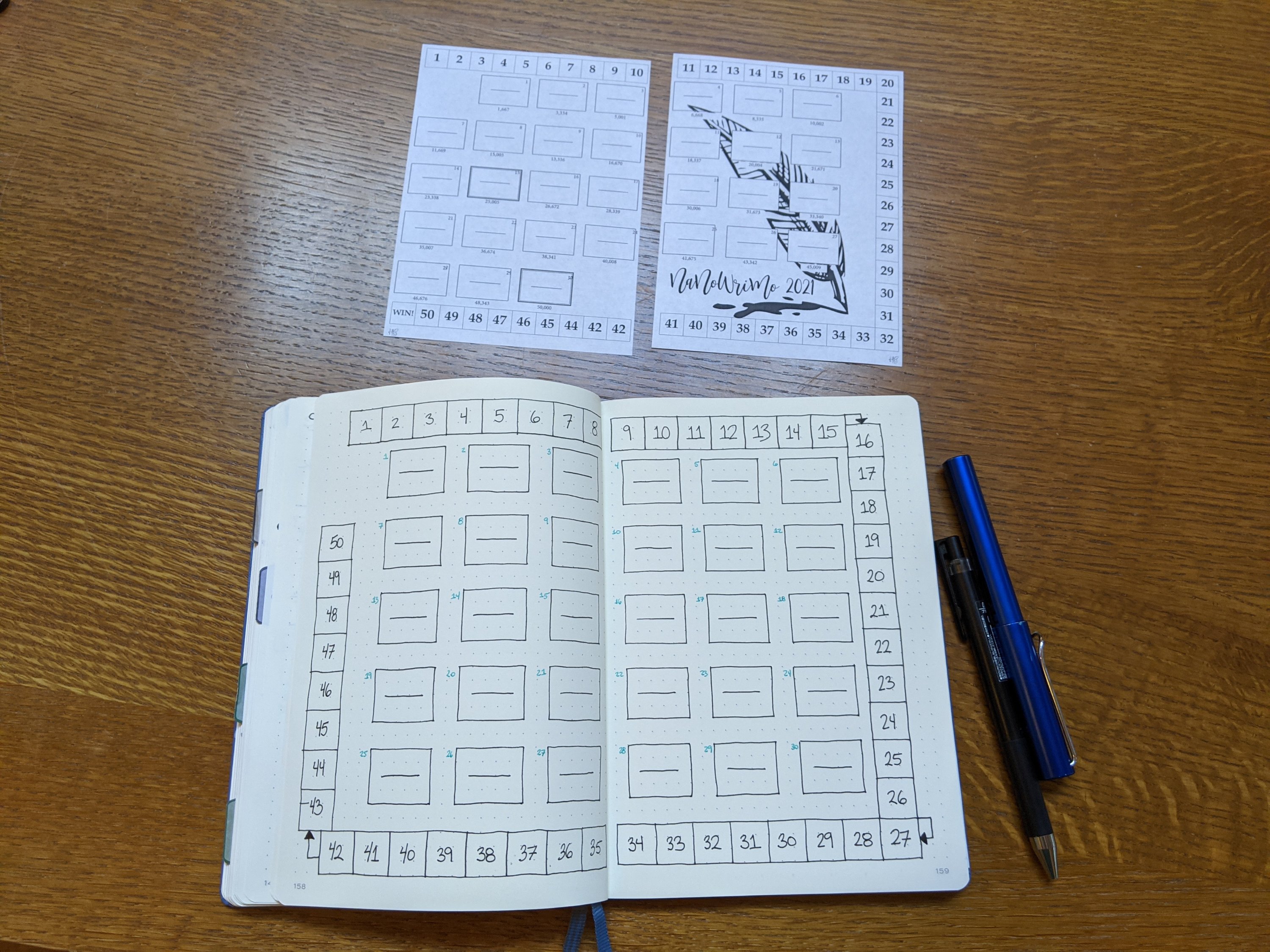
Once I have all this figured out, I may be feeling slightly overwhelmed. So, it’s time to get out my notebook and pens and draw myself a motivational tracker for my bullet journal. Spreadsheets are good for math, but coloring in progress in my notebook is much more satisfying that plugging numbers into a spreadsheet.

As you can see in the picture, I was going to the word count tracker from Sarra Cannon’s Preptober workbook. I printed it out and cut it to paste into my bullet journal and everything. But the daily word count goals in that tracker were already printed on each day. So I ended up drawing my own tracker in my bullet journal, modeled after the one from the workbook. I still need to spruce it up a bit and add milestone markers and daily word count goals, but I’ll save the final version for a future post.

And that’s it. Can you believe it? This is the last of my NaNoWriMo prep posts. I hope you’ve enjoyed this series. I know I’ve enjoyed writing them.

If there’s more writing-related content that you’d like me to post about, let me know in the comments. Otherwise, see you back here again next week when it’s time to set up my reading journal for November! Until then, happy writing!

NaNoWriMo Prep: Organize Your Life

If you’ve been reading this blog for a while, you know I’m a total planner geek. So, bust out your bullet journal or planner and let’s make our NaNo Prep checklist!

As a reminder, the schedule for NaNoWriMo prep is as follows:

  1. Develop a Story Idea (September 12-18) — Click Here to Read This Post
  2. Create Complex Characters (September 19-25) — Click Here to Read This Post
  3. Construct a Detailed Plot or Outline (September 26 – October 2) — Click Here to Read This Post
  4. Build a Strong World (October 3-7) — Click Here to Read This Post
  5. Organize Your Life for Writing! (October 10-16) <— You Are Here
  6. Find and Manage Your Time (October 18-24)

When it comes time to get organized for writing, I start by making a series of lists.

For the first list, I turn to a fresh, blank page in my bullet journal and title it something like “Task/Project Brain Dump.” Then I make a list of all the chores and tasks and other administrative stuff that I know I’m going to have to deal with between now and the end of November. These are things like planning meals, grocery shopping, paying bills, feeding my sourdough starter, cleaning the house, and finishing all the various home improvement projects that are currently important but not urgent but may become urgent before the end of November.

I try to capture everything I can think of in that one place. Sometimes this means going and checking my email for things I’ve snoozed that are going to pop up with a reminder (subscriptions to renew or cancel, emails I need to reply to, events I said I’d schedule and need to follow up on, etc.). One thing I know from experience that always comes up and causes a huge distraction and potential time suck during November is holiday gift planning. So that goes on the list as well.

Once I have my list, I start going through it to see what can be done early (now) and what can be delayed until after November. For example, I may have to wait to clean the house closer to when my guests are arriving, but I can make a meal plan and stock up on groceries now so I don’t have to go shopping as often in November. Similarly, I can come up with a plan for gift giving and/or holiday cards that does not require me spending days researching the perfect book to give each of my niblings when I should be writing. (Yes, I am the aunt who gives books for holidays and birthdays.)

The trick here is that I have to keep in mind that some tasks that I decide really need to be done later (like gift buying, because deals!), are absolutely going to take longer than I think they are going to take, and they have the potential to make me completely lose a day of writing. When the middle of November rolls around, and I’m convinced that everything I’m writing is garbage and words are hard, book browsing is going to be much more fun than book writing, and there goes my word count. This totally happens every year, so I try to keep that in mind and keep those sorts of distractions to a minimum by getting as much done early as possible.

One resource for getting organized that I used last year and am using again this year is Sarra Cannon’s excellent Preptober workbook. It has tips for meal planning as well as worksheets to help you calculate how much writing time you should plan for each day (which I’ll talk more about in next week’s post). I definitely recommend checking out this video which walks you through all of it over on her Heart Breathings YouTube channel.

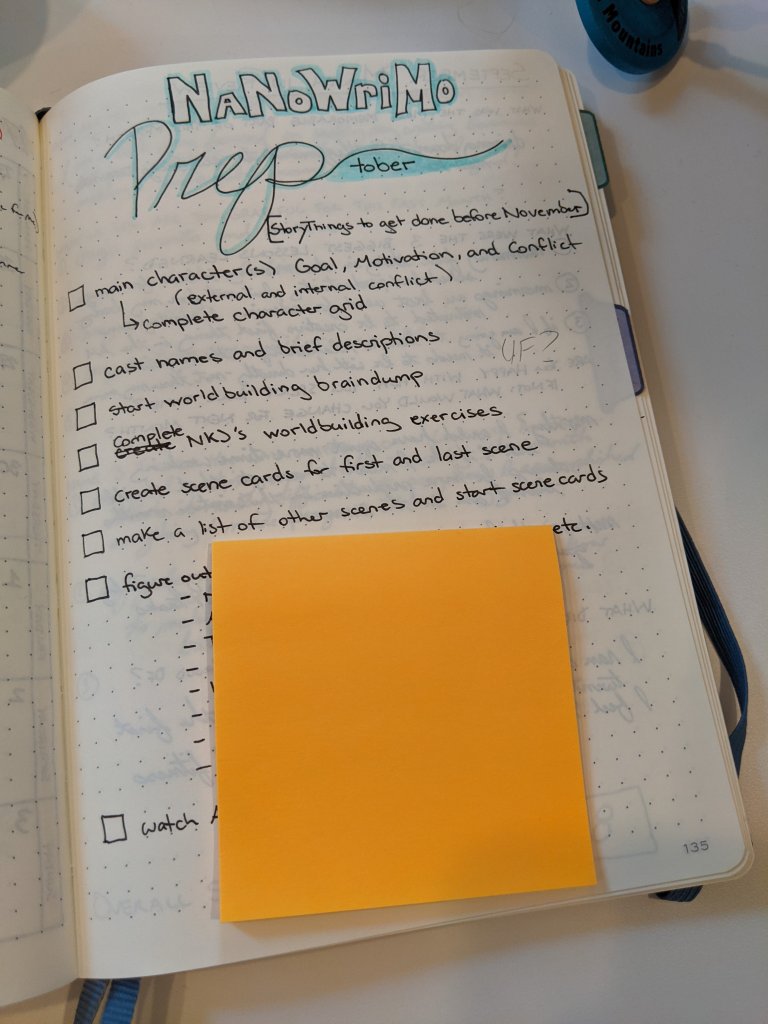
In addition to my tasks and projects list, I also have a list dedicated to the NaNo Prep tasks that I want to try to complete before I start writing. This year’s list looks like this:

Strategic post-it pad placement to cover up the story-specific tasks.

The third list I make is for my writing rewards. I usually have two types of rewards. The first type is either a “you can’t do X until you get Y words written” or a “you can do Z after you’ve hit your daily word count goal” type of goal. Usually it’s a combination of the two that’s geared toward trying to trick myself into getting my words for the day written and complete as early as possible in the day. The second type is the more traditional (and usually bigger) milestone rewards which I usually assign for 10k, 25k, 40k, and 50k words written, plus “first draft done” which is usually around 60-70k for me.

For the first type of reward, I basically go into what I (who don’t have kids) think of as “parent mode” and come up with a set of daily rules to live by that encourage me to prioritize my writing. For example: “you can’t watch any YouTube videos until after you’ve written 500 words.” The key here is figuring out what carrots are going to be the sweetest (metaphorically) when it comes time to write and using those as the incentive.

In the past, I tried using reading time as an incentive, but I eventually realized that doesn’t work for me. It basically ends in me both not writing and not reading. I just find other (admin/chore) things to do that feed my need to procrastinate, then I (at best) squeeze in my word count at the last possible minute of the day and have no time left for what was supposed to be my fun reward. This may be because reading (for me) is more of a relaxing escape from the world than it is an activity that I’m going to be frustrated by not being able to do (unless I’m in the middle of a fast paced book, but those don’t last long enough to work as rewards for a 30-day writing challenge).

Instead, it seems to work better if I use things like social media, YouTube, and casual gaming as a reward because those are the things that I usually don’t want to delay until later. I want to do them when I want to do them. So, if I have to get some number of words in first, I am much more likely to stop procrastinating and make that happen. This means that my rules usually look more like:

  • No Twitter or Instagram until after I’ve met my daily word count goal. (I usually just log out of Facebook completely whenever I’m trying to focus on writing because it almost never “sparks joy” and almost always leads to pointless negative feelings and/or frustrated rage at humanity, and who has time for that, really?)
  • I can watch one YouTube video or play one Magic the Gathering Arena game for every 500 words I write, then I can watch as many videos or play as many games as I want after I’ve hit my daily word count goal.

The second type of goal (milestone rewards) are a lot harder for me. I hesitate to use buying things as a reward for writing words. Similarly, I’m reluctant to use food as a reward. That makes it really hard to come up with good milestone rewards. Usually I just make it up as I go along, or completely neglect this step of my writing prep process. But rewards are important, so I am determined to do better. Right now, I’m on the hunt for good ideas for milestone rewards. If you have any, please let me know in the comments.

All of these lists and rules are a really important part of my planning process, but my favorite part of getting organized to write is setting up my Scrivener file. If I haven’t created it already (back when I was working on plot or character, for example), then I save a new file using a Scrivener template I’ve created that aligns with the beat sheet I talked about back in the post on plotting. This file has descriptions of each beat in the notes section of each chapter. It also has target word counts for each scene/chapter that tally up to my target total word count. Once I’ve saved a copy, I load it up with all the character and world and plot stuff that I’ve been working on, copying over and organizing things based on the notes I made in my notebook.

I can easily lose hours on setting up Scrivener, but having a template with beats and word count targets already set up makes it so much faster to get going. So even if everything isn’t copied over from my notebook perfectly before the first of November, I have the bare bones of what I need to get started writing. This is good because making these lists reminded me how much more I have to do before NaNoWriMo starts. In just over two weeks! Yikes! This month is flying by, and my to-do list has just doubled in size. Time to get back to work. Happy planning!